
135 lines
6.5 KiB
Markdown
135 lines
6.5 KiB
Markdown
# GREE Controller — Home Assistant add-on
|
|
|
|
Repozytorium: `https://git.linuxiarz.pl/gru/gree-controller-ha-addon/`
|
|
Obraz OCI: `zot.linuxiarz.pl/gree-controller:<version>`
|
|
|
|
---
|
|
|
|
## PL
|
|
|
|
### Instalacja
|
|
|
|
W Home Assistant dodaj jako własne repozytorium:
|
|
|
|
```text
|
|
https://git.linuxiarz.pl/gru/gree-controller-ha-addon/
|
|
```
|
|
|
|
Odśwież sklep dodatków/aplikacji i zainstaluj **GREE Controller**. `config.yaml` wskazuje gotowy wieloarchitekturowy obraz OCI; jego tag musi być równy polu `version`.
|
|
|
|
### Sieć, VLAN i discovery
|
|
|
|
|
|
|
|
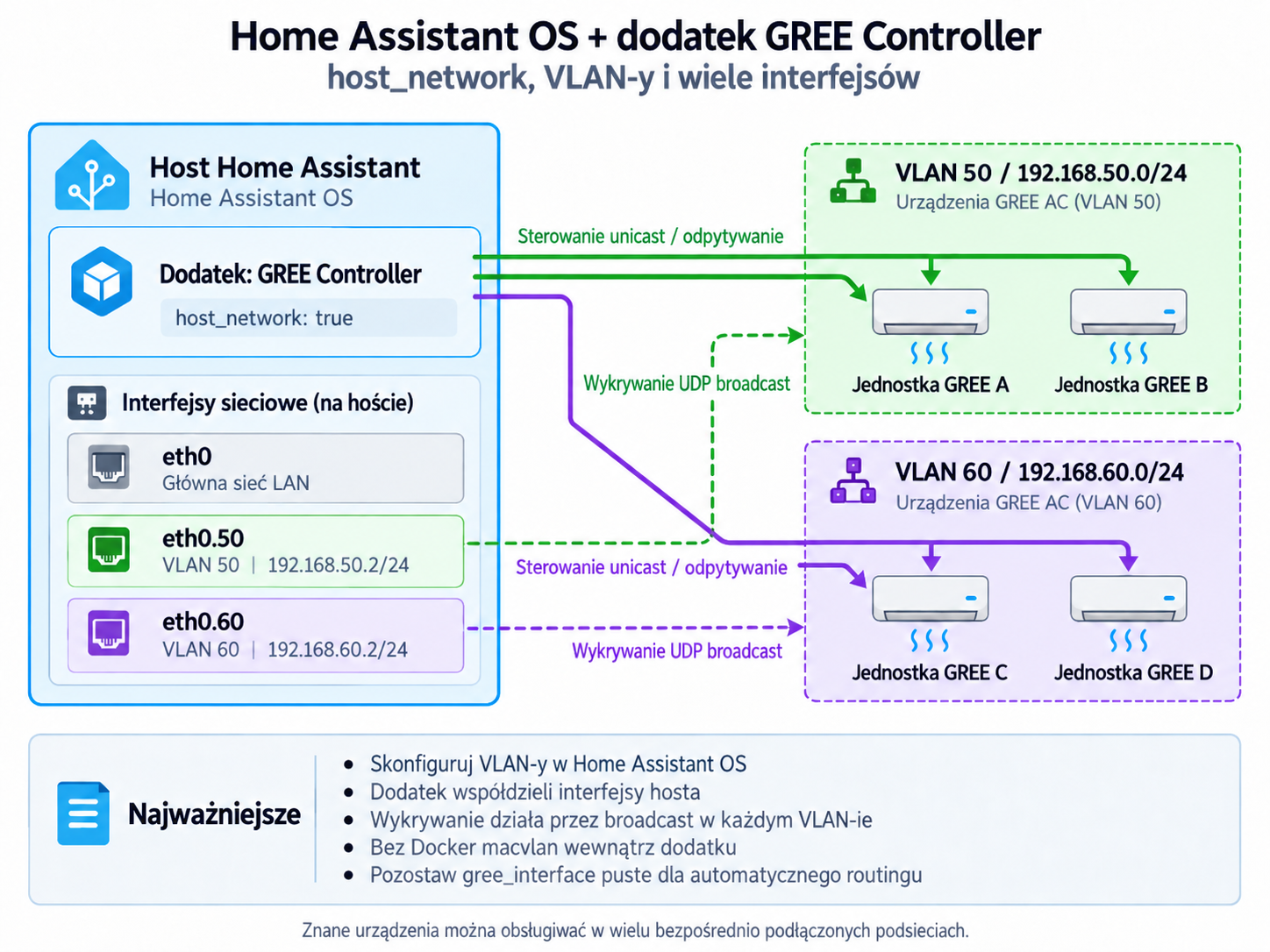
Dodatek celowo używa `host_network: true`, więc korzysta bezpośrednio z interfejsów hosta Home Assistant OS. Nie twórz dla niego Docker `macvlan`.
|
|
|
|
Interfejsy hosta:
|
|
|
|
```bash
|
|
ha network info
|
|
```
|
|
|
|
Przykład VLAN 50 na `eth0`, bez dodatkowej bramy domyślnej:
|
|
|
|
```bash
|
|
ha network vlan eth0 50 \
|
|
--ipv4-method static \
|
|
--ipv4-address 192.168.50.2/24 \
|
|
--ipv6-method disabled
|
|
```
|
|
|
|
Dla jednej sieci GREE ustaw `gree_interface` na nazwę interfejsu (np. `eth0.50`) albo jego lokalny IPv4 (np. `192.168.50.2`) oraz `discovery_broadcast` na broadcast tej podsieci, np. `192.168.50.255:7000`.
|
|
|
|
Dla wielu bezpośrednio podłączonych podsieci pozostaw `gree_interface` puste. Kontroler dobiera lokalny interfejs najlepiej pasujący do IP znanego urządzenia. Discovery nadal wysyła jeden broadcast na skan, więc każdą podsieć/VLAN skanuj osobno, zmieniając `discovery_broadcast`, albo dodaj znane urządzenia ręcznie.
|
|
|
|
Broadcast zwykle nie przechodzi przez router. Sterowanie unicast może działać przez routing/firewall, jeżeli UDP jest dozwolone. Gdy urządzenia są w routowanym VLAN-ie, zapewnij hostowi HA interfejs w tej sieci, relay broadcast UDP albo wykonuj discovery lokalnie dla każdej podsieci.
|
|
|
|
### Opcje
|
|
|
|
| Opcja | Znaczenie |
|
|
|---|---|
|
|
| `gree_interface` | interfejs lub lokalny IPv4; puste = automatyczny dobór trasy |
|
|
| `discovery_broadcast` | cel discovery UDP, np. `192.168.50.255:7000` |
|
|
| `simulate` | praca bez fizycznych urządzeń |
|
|
| `auto_seed` | przykładowe urządzenie w pustej bazie symulatora |
|
|
| `poll_interval_seconds` | interwał odpytywania urządzeń |
|
|
| `zone_interval_seconds` | interwał sterowania strefami/termostatem |
|
|
| `discovery_timeout_ms` | timeout discovery UDP |
|
|
| `app_token` | opcjonalna ochrona bezpośredniego Web UI/API |
|
|
| `log_level` | `error`, `warn`, `info`, `debug`, `trace` |
|
|
|
|
### Home Assistant API
|
|
|
|
Dodatek korzysta automatycznie z wewnętrznego proxy Home Assistant Core (`http://supervisor/core/api/`) i tokenu `SUPERVISOR_TOKEN` przekazywanego przez Supervisor. Nie konfiguruj ręcznie URL ani Long-Lived Access Token dla połączenia kontrolera z Home Assistant. Token Supervisor jest używany tylko w pamięci procesu i nie jest zapisywany w SQLite.
|
|
|
|
### Dostęp, dane i bezpieczeństwo
|
|
|
|
Usługa słucha na TCP `8787`; ingress Home Assistant przekazuje Web UI na ten port. Jeżeli `8787` jest osiągalny z niezaufanej sieci, ustaw `app_token` albo zablokuj port firewallem. Baza jest zapisywana w `/data/gree-controller.db`; konfiguracja używa `backup: cold`, więc dane są objęte backupem dodatku.
|
|
|
|
Watchdog sprawdza `/api/health`. Do diagnostyki sieci najpierw sprawdź `ha network info`, poprawność `gree_interface`, broadcast konkretnej podsieci i reguły UDP/firewalla.
|
|
|
|
---
|
|
|
|
## EN
|
|
|
|
### Installation
|
|
|
|
Add this custom repository in Home Assistant:
|
|
|
|
```text
|
|
https://git.linuxiarz.pl/gru/gree-controller-ha-addon/
|
|
```
|
|
|
|
Refresh the app/add-on store and install **GREE Controller**. `config.yaml` points to a pre-built multi-architecture OCI image; its tag must match `version`.
|
|
|
|
### Networking, VLANs and discovery
|
|
|
|
|
|
|
|
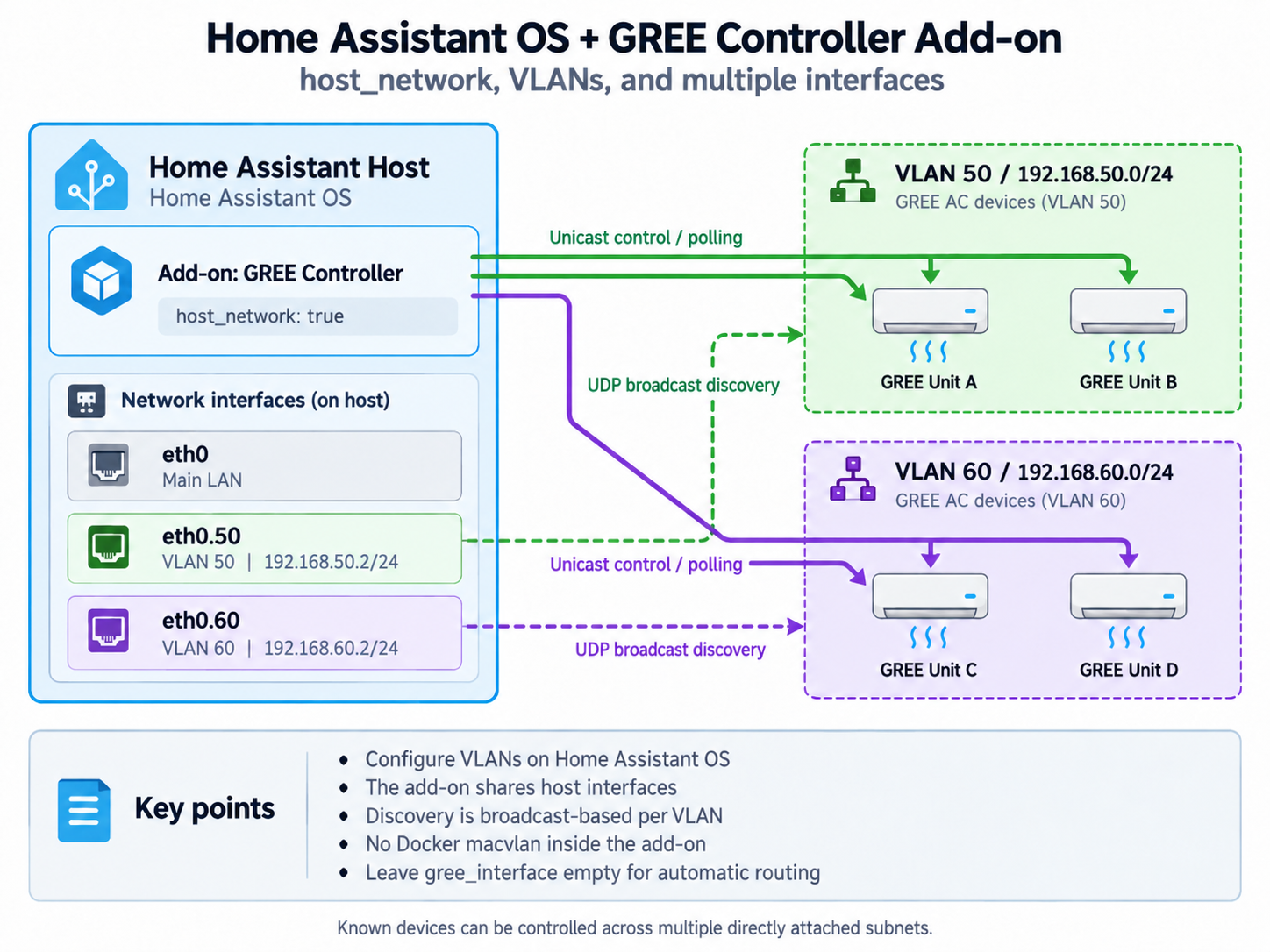
The add-on intentionally uses `host_network: true`, so it uses the Home Assistant OS host interfaces directly. Do not attach a Docker `macvlan` network to the add-on.
|
|
|
|
Inspect host interfaces with:
|
|
|
|
```bash
|
|
ha network info
|
|
```
|
|
|
|
Example VLAN 50 on `eth0`, without adding another default gateway:
|
|
|
|
```bash
|
|
ha network vlan eth0 50 \
|
|
--ipv4-method static \
|
|
--ipv4-address 192.168.50.2/24 \
|
|
--ipv6-method disabled
|
|
```
|
|
|
|
For one GREE subnet, set `gree_interface` to the host interface name (for example `eth0.50`) or its local IPv4 address (for example `192.168.50.2`), and set `discovery_broadcast` to that subnet broadcast, e.g. `192.168.50.255:7000`.
|
|
|
|
For multiple directly attached subnets, leave `gree_interface` empty. The controller selects the local interface that best matches a known device IP. Discovery still sends one broadcast per scan, so scan each VLAN/subnet separately by changing `discovery_broadcast`, or add known devices manually.
|
|
|
|
Broadcast normally does not cross routers. Unicast control may work through routing/firewall rules when UDP is allowed. For routed GREE VLANs, give the HA host an interface in the VLAN, use a suitable UDP broadcast relay, or perform discovery locally per subnet.
|
|
|
|
### Options
|
|
|
|
| Option | Meaning |
|
|
|---|---|
|
|
| `gree_interface` | interface or local IPv4; empty = automatic route selection |
|
|
| `discovery_broadcast` | UDP discovery target, e.g. `192.168.50.255:7000` |
|
|
| `simulate` | run without physical devices |
|
|
| `auto_seed` | create a sample device in an empty simulator database |
|
|
| `poll_interval_seconds` | device polling interval |
|
|
| `zone_interval_seconds` | thermostat/zone control interval |
|
|
| `discovery_timeout_ms` | UDP discovery timeout |
|
|
| `app_token` | optional protection for direct Web UI/API access |
|
|
| `log_level` | `error`, `warn`, `info`, `debug`, `trace` |
|
|
|
|
### Home Assistant API
|
|
|
|
The add-on automatically uses the internal Home Assistant Core proxy (`http://supervisor/core/api/`) and the runtime `SUPERVISOR_TOKEN` provided by Supervisor. Do not configure a Home Assistant URL or Long-Lived Access Token for the controller-to-Home-Assistant connection. The Supervisor token is used only at runtime and is not stored in SQLite.
|
|
|
|
### Access, data and security
|
|
|
|
The service listens on TCP `8787`; Home Assistant ingress proxies the Web UI to that port. If `8787` is reachable from an untrusted network, configure `app_token` or block the port at the firewall. The database is stored in `/data/gree-controller.db`; `backup: cold` keeps it in the add-on backup.
|
|
|
|
The watchdog checks `/api/health`. For network troubleshooting, verify `ha network info`, `gree_interface`, the selected subnet broadcast, and UDP/firewall rules first.
|